Veo Shared Micromobility
Texas A&M Transportation Services has partnered with Veo to offer our customers more sustainable alternative modes of transit around campus.
More than 1,800 throttle e-bikes are available for use by students, faculty, staff and visitors to campus.
Riders are required to lock Veo bikes to a rack or approved parking device before ending their rides.
Failure to lock the bike to a rack will result in fines up to $75 and account suspension.
Please review the information on the website for complete program details.
You must register with a university email address to access to discounted rates. Rates subject to change.
Getting Started
Find a ride.
Use the Veo app to find an available bike near you.
Scan to unlock.
Scan the bike’s QR code or enter its ID to unlock it. Enjoy your ride!
Lock your device to a bike rack or Veo parking area.
When your trip is complete, your bike must be locked to a bike rack or designated Veo parking area within the geofence to end your ride.
Dos and Dont's
Where to park
Yes, please
BIKE RACK
Riders must lock their bike to a rack (rear wheel facing rack).
Failure to do so will result in a fine, and repeat offenders will be suspended from the program.
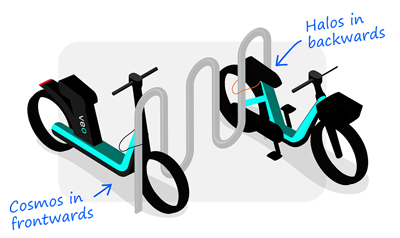
Park only at bike racks on campus. Lock your vehicle to end your trip.
Identify parking areas in the app, park your vehicle next to bike rack and use the lock device to secure it.
Please don't

IN THE WAY
Don’t block crosswalks, sidewalk, fire hydrants, outdoor furniture, driveways or doorways.
PRIVATE PROPERTY
Please don’t be rude by parking on private property.
ACCESSIBLE RAMPS
Don’t park your bike on ramps as they may be used for accessibility purposes (subject to immediate fine).
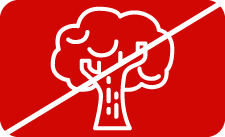
TREES & PLANTS
Don’t lock your bike to trees as it could damage the greenery.
Safety tips

FOLLOW THE LAW
Obey all traffic laws at all times.
USE HEADGEAR
Protect your head by wearing a helmet.
CHECK THE BIKE
Check the bike before riding. Use the app to request maintenance.
GO WITH THE FLOW
Follow traffic. This prevents bicycle/pedestrian accidents.

STAY ALERT
Pay attention to your surroundings.

USE GESTURES
Use hand signals to let others know where you are going.